Filter results and save favorites
Narrow the preset list and the similar-sound results to some synths or to your favorites, and export your favorites as a CSV shortlist.
The left side of the Search tab is a filter. It applies to both the preset list and the similar-sound results.
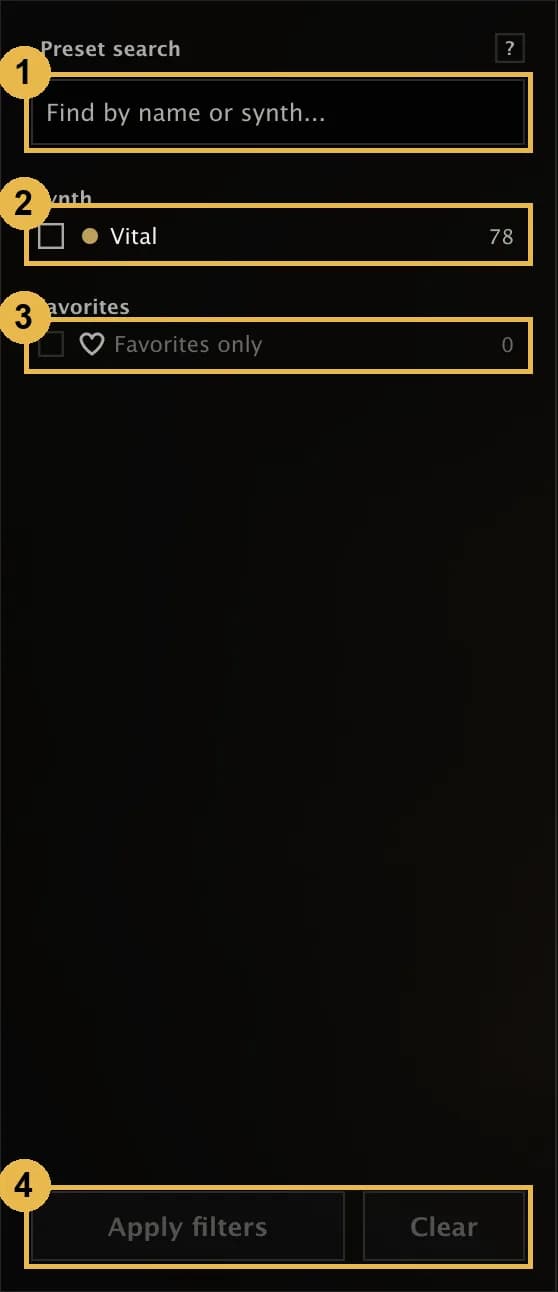
- Type in the box to find presets by name or synth. The list updates as you type.
- Tick one or more synths under Synth. Each one shows how many presets it would leave.
- Tick Favorites only to see just the presets you've saved.
- Press Apply filters. Clear shows everything again.
With more than 10 synths, a Find synth box appears next to the synth list so you can find one quickly. Synths you've ticked always stay visible.
Save favorites
Click the heart on any preset, in the preset list or in the similar-sound results, to save it. Click again to remove it.
Favorites stay when you use Clear data, and come back once you rebuild those synths.
Export your favorites
With Favorites only on, click Export above the preset list. Presetti saves a CSV file with each favorite's synth, preset name and file, which you can open in a spreadsheet or share.